Tuesday, 20 March 2012

TOUCH SCREEN & TOUCHLESS TOUCH SCREEN

A touch screen is an electronic visual display that can detect the presence and location of a touch within the display area.
Touchscreens are common in devices such as game consoles, all-in-one computers, tablet computers, and smartphones.

The first touch screen was a capacitive touch screen developed by E.A. Johnson at the Royal Radar Establishment, Malvern, UK. 
How do touch-screen monitors know where you're touching?

There are three basic systems that are used to recognize a person's touch:
·         Resistive
·         Capacitive
·         Surface acoustic wave
The resistive system consists of a normal glass panel that is covered with a conductive and a resistive metallic layer. These two layers are held apart by spacers, and a scratch-resistant layer is placed on top of the whole setup. An electrical current runs through the two layers while the monitor is operational. When a user touches the screen, the two layers make contact in that exact spot. The change in the electrical field is noted and the coordinates of the point of contact are calculated by the computer. Once the coordinates are known, a special driver translates the touch into something that the operating system can understand, much as a computer mouse driver translates a mouse's movements into a click or a drag.
In the capacitive system, a layer that stores electrical charge is placed on the glass panel of the monitor. When a user touches the monitor with his or her finger, some of the charge is transferred to the user, so the charge on the capacitive layer decreases. This decrease is measured in circuits located at each corner of the monitor. The computer calculates, from the relative differences in charge at each corner, exactly where the touch event took place and then relays that information to the touch-screen driver software. One advantage that the capacitive system has over the resistive system is that it transmits almost 90 percent of the light from the monitor, whereas the resistive system only transmits about 75 percent. This gives the capacitive system a much clearer picture than the resistive system.
On the monitor of a surface acoustic wave system, two transducers (one receiving and one sending) are placed along the x and y axes of the monitor's glass plate. Also placed on the glass are reflectors -- they reflect an electrical signal sent from one transducer to the other. The receiving transducer is able to tell if the wave has been disturbed by a touch event at any instant, and can locate it accordingly. The wave setup has no metallic layers on the screen, allowing for 100-percent light throughput and perfect image clarity. This makes the surface acoustic wave system best for displaying detailed graphics (both other systems have significant degradation in clarity).
Another area in which the systems differ is in which stimuli will register as a touch event. A resistive system registers a touch as long as the two layers make contact, which means that it doesn't matter if you touch it with your finger or a rubber ball. A capacitive system, on the other hand, must have a conductive input, usually your finger, in order to register a touch. The surface acoustic wave system works much like the resistive system, allowing a touch with almost any object -- except hard and small objects like a pen tip.
  Flat surface acts as a touch screen 
  The device uses an infra-red touch sensing system that transforms a projected image into a virtual 10-inch touch screen. It allows users to interact with multimedia content and applications by touching the image, which can be projected onto any flat surface.
 . The system creates bright, high-quality WVGA resolution video images ,projection .   Use of a Class 1 safety laser makes the HPL system eye safe.
 . Light Touch has 2GB of onboard Flash memory and a Micro SD card slot that supports up to 32GB. The device can be battery operated with a run-time of 2 hours or wall powered for continuous use. Light Touch runs Adobe Flash Lite 3.1, which provides access to a large developer community and enables rapid development of applications such as those that provide interactive wall projections in the home and in retail spaces.
 The Age Of Touchscreen Is Soon To Be Over
The best and the most common technology we have So far is the touchscreen technology. no matter if it’s a smartphone or a tablet computer, touchscreen is the main feature you will find in any of those gadgets. but now it seems like the touchscreen will soon be taken over with the touchless technology. this was proved with Microsoft releasing their kinect technology. but no one ever thought that this would be big enough to compete with the touchscreen technology. but  according to the latest news, the opinions are beginning to change.
According to the BBC, XTR3D, an Israeli company is now planning to launch smartphones and tv’s with a touchless technology. with this new  technology people will be able to change channels of their TV by just making a gesture with the hand without using any kind of remote controls. According to a XTR3D spokesperson, XTR3D’s technology has all the advantages of a 3D camera – it can work in broad daylight, is much cheaper and uses a lot less power. It can be installed on any consumer electronics device. and the best part is this is not just a research, the company is expecting to release the first motion control smartphone to the market, early next year.
 
    
HP's Touchless touchscreen wall

About a year ago, HP began working on a ginormous touchscreen display for their PR firm’s Manhattan offices. The resulting product, called the Wall of Touch, was such a hit that it has found its way into the workplaces of other select clients, with more on the way. Ironically, despite its name, one of the things that makes the Wall unique is that users don’t have to actually touch it.
The Wall of Touch is made up of as many as nine 43 to 46-inch, 1080p panels. HP decided not to go with one big panel, as it would require rear projection and a translucent screen material that would compromise resolution. The Wall is driven by an HP Z800 workstation, essentially making it a huge HP TouchSmart computer. Built-in optical cameras and a magnetic strip detect when users are nearing it, thus the lack of needing to actually touch the screen. If users can’t reach the corners, it still works with a mouse or keyboard.
Versions of the Wall are currently in use at the headquarters of the National Basketball Association, as well as the Continental Airlines counter in the Houston airport.

Faster measurements also have the benefit of reducing overall system power. The infrared LED is the biggest contributor to a proximity system’s power budget. Minimizing the time that the LED needs to remain on reduces the overall system power consumption. With 15 dynamically adjustable LED drive settings, the LED drive strength can be adjusted based on the ambient infrared conditions, thereby saving power and leading to a more energy-efficient design.
The LED no longer must be set at a power-hungry maximum setting. Highly sensitive photodiodes also enable the sensor to operate behind very dark glass so that the electronics can remain hidden to the human eye, resulting in cleaner, sleeker industrial designs.
Triple the LEDs, triple the innovation
While single-LED proximity systems are driving today’s market, the future is geared toward multi-LED proximity sensor systems enabling unique innovations in user interfaces. Two-LED infrared systems enable slide and select gestures for use in applications such as page turning in e-books, volume selection in home audio equipment, or scrolling in tablet PCs. Three-LED proximity systems can be used for 3D positional calculation and multi-axis gesturing. These three-LED systems can be used for touchless UI navigation such as icon or photo selection, zooming-in and out in mapping applications, or even game controls.
Other, more exciting applications for two- and three-LED proximity systems are limited only by the designer’s imagination. Just as capacitive touchscreens ushered in a new era of user interfaces, touchless gesturing technology will similarly change how end users interact with electronics products. Two- and three-LED infrared proximity sensor solutions are well suited as touchless-gesturing solutions in these systems.
Touchless benefits: health, safety and convenience
A valid challenge to touchless interfaces is why they should be implemented at all.
Infrared systems are not going to replace existing systems, but instead they are going to augment the user experience.   No longer are “computers” relegated to use in the home study or on an office desk. These days people travel everywhere with their smart handsets, personal media players, e-books and tablet PCs.
Coffee shops, restaurants, gyms, bus stops, plane terminals and even lavatories are fair usage environments for this new generation of embedded electronics. In such diverse operating environments, users’ hands are sometimes occupied, dirty, sweaty, or covered in food -- all conditions not conducive to touchscreen operation. If a customer is reading an e-book at the gym while on a treadmill and wants to turn a page, it would be a much easier to swipe across the device with a touchless gesture to turn the page rather than physically contacting a touchscreen or hunting down a small button.
Being able to control a device without having to look at it has additional benefits. For example, a touchless interface can allow an automobile driver to safely start/end a call or adjust volume with the touchless swipe of a hand without having to navigate through a complicated instrument cluster to find control buttons. Not all devices have or need complex graphical displays with touchscreens either, and for such devices a touchless interface can provide an innovative and differentiated approach for operation.


Thursday, 1 March 2012

RIDDLE

  1. I am a box that holds keys without locks, yet they can unlock your soul. what am I?
  2. I am the beginning of the end, and the end of time and space. I am essential to creation, and I surround every place. What am I?
  3. I used to eat in my leg who am I?
  4. "22222222 day" how do you call me?
  5. "podpodpod" how do you call me?
  6. I will show you and you will hang me. who am I?
  7. white pearls in green chest.
  8. a palace with 32 guards?
  9. vegetable with a crown?
  10. which is the costliest vegetable?


ANSWERS:
  1. Piano
  2. The letter e. End, timE, spacE, Every placE
  3. Crab
  4. Tuesday (i.e) 2's day
  5. Tripod
  6. Mirror
  7. Ladies finger
  8. Mouth
  9. Brinjal
  10. Carrot (i.e) Carat


MAGNETIC LEVITATION


MAGLEV TRAINS:
 There is a new form of transportation that could revolutionize transportation of the 21st century the way airplanes did in the 20th  century. A few countries are using powerful electromagnets to develop high-speed trains, called maglev trains.
 Maglev is short for magnetic levitation, which means that these trains will float over a guide way using the basic principles of magnets to replace the old steel wheel and track trains. We know that in magnet opposite poles attract and like poles repel each other. This is the basic principle behind electromagnetic propulsion. Electromagnets are similar to other magnets in that they attract metal objects, but the magnetic pull is temporary. There are three components to this system.
­The big difference between a maglev train and a conventional train is that maglev trains do not have an engine, at least not the kind of engine used to pull typical train cars along steel tracks. The engine for maglev trains is rather inconspicuous. Instead of using fossil fuels, the magnetic field created by the electrified coils in the guide way walls and the track combine to propel the train.

THE MAGLEV TRACKS:

The magnetized coil running along the track, called a guide way, repels the large magnets on the train's undercarriage, allowing the train to levitate between 0.39 and 3.93 inches (1 to 10 cm) above the guide way. Once the train is levitated, power is supplied to the coils within the guide way walls to create a unique system of magnetic fields that pull and push the train along the guide way.

The electric current supplied to the coils in the guide way walls is constantly alternating to change the polarity of the magnetized coils. This change in polarity causes the magnetic field in front of the train to pull the vehicle forward, while the magnetic field behind the train adds more forward thrust. Maglev trains float on a cushion of air, eliminating friction. This lack of friction and the trains' aerodynamic designs allow these trains to reach unprecedented ground transportation speeds of more than 310 mph(500 kph), or twice as fast as Amtrak's fastest commuter train.  
 Developers say that maglev trains will eventually link cities that are up to 1,000 miles (1,609 km) apart. Although based on similar concepts, the German and Japanese trains have distinct differences. In Germany, engineers have developed an electromagnetic suspension (EMS) system, called Transrapid. In this system, the bottom of the train wraps around a steel guide way. Electromagnets attached to the train's undercarriage are directed up toward the guide way, which levitates the train about 1/3 of an inch (1 cm) above the guide way and keeps the train levitated even when it's not moving. Other guidance magnets embedded in the train's body keep it stable during travel.  
While maglev transportation was first proposed more than a century ago, the first commercial maglev train made its test debut in Shanghai, China, in 2002 using the train developed by German company several   countries have plans to build their own maglev trains. U.S. cities from Los Angeles to Pittsburgh have had maglev line plans in the works.   


Thursday, 23 February 2012

RESUME


RAMA
E-mail: YYYY
Mobile: +91-XXXXX

PROFESSIONAL OBJECTIVE
Wish to build a career with leading corporate with hi-tech environment with committed and dedicated people which has a lot of scope for application of my skills and knowledge.

PROFESSIONAL SUMMARY
Project                             : Developed a project based on Embedded Systems.
Name of the Project        :  Minerals Detector
Month/Year                     : June 2010.
Members                         : 5
Role of the Member        : Project Leader.
Outcome                         : 96%
Project Institute              : ABC technology, Chennai.

EDUCATIONAL PROFILE
·         UG                           :  B.E(Electronics and Communication ),XXXX College of
                                         Engineering, 97%, May 2011                                                                                                     
·         Higher Secondary    : XXXX girls higher secondary school,70%, June 2009
·         SSLC                       : XXXX girls higher secondary school,82%,march 2007

SOFTWARE SKILLS
  • Language                  :   C, C++, Java, Oracle.
  • OS                             :   Windows 98/2000/XP/7

AREA OF INTEREST
  • Embedded Systems.
  • VLSI.
INPLANT TRAINING  
  • BSNL Chennai telephones (2009-2010).
  • Radio astronomy center, Ooty (2010-2011)

ACCOLADES  
  • Won  Second Prize in ADDZAP in Symposium
  • Got Rajayapurushkar Award in Bharat Scout and Guide
  • Participated in Technical Events in many National Level Symposiums

CO CURRICULAR ACTIVITIES
  • Debugging Event Coordinator for College Symposium FEST 2009.

EXTRA CURRICULAR ACTIVITIES
  • State level kho-kho player
  • Member of National Social Service
  • Member of Bharat scout and Guide
  • Brown belt 3rd que in Karate
  • Interested in doing Drawing and craft work

PERSONAL PROFILE  
Fathers Name                       :            Mr. K.Krishnan
Date of Birth                         :            date/month/year
Hobbies                                 :            Numismatics, listening music, playing chess.
Nationality                            :            Indian
Marital Status                      :            Single
Address                                 :            YYYY


(RAMA)

Saturday, 18 February 2012

Do you know

· The memory span of a gold fish is up to 3 seconds.
· A average man laughs 13 times per day.  
· Right handed person will tend to chew your food on your right side and the left handed will tend to chew your food on your left side.
·  The only 2 animals that can see behind itself without turning its head are the rabbit and the parrot. 
· Men’s shirts have the buttons on the right, but women’s shirts have the buttons on the left.
· FACETIOUS & ABSTEMIOUS  are  the only two words were vowels are arranged in right sequence of vowel.
· why James Bond have his secret code as 007? This is because during the world war Russian's state code is 007.
· Check Mate is derived form the word SHAH MAT which means the king is dead.
· In the world their are 11% of left handers.
· An average 6 yr old child will  laugh  300 times per day. 
· sherlock homes is the name which is named for many characters in the films. 
· Sachin Tendulkar is the first player who got out from 3rd umpire. 
·  Mohamad is the name used in more numbers around in the world.
· 2 letters that  repeated  3 times in a single word is deeded .
· Rhythmns  is the word which doesn't has vowels in it.
· the only word which ends with 'mt' is dreamt.
· A word therin can frame 13 words from it, they are

1.      the
2.      he
3.      her
4.      here 
5.      re
6.      i
7.      there
8.      er
9.      rein
10.  re
11.  in
12.  therein
13.  herein 

EYE GAZE SYSTEM


EYE GAZE SYSTEM

INTRODUCTION:

Eyegaze is to run the system with eyes by looking, it control keys displayed on a screen, a person can synthesize speech, control his environment. The Eyegaze system is for communication and control system for people with complex physical disabilities. It is a potential porthole into current cognitive process and communication through the direction of eyes is faster than any other mode of human communication.

DEVELOPMENT:

The Eyegaze system is a direct – select vision controlled communication and control system. It was developed in FairfaxVirginia by LC technologies Inc...  This system is developed for those who lack the use of their hands or voice. Its users are adults and children with cerebral palsy, spinal cord injuries, ALS, multiple scleroses, and werding – Hoffman syndrome.

WORKING:

Eyegaze system uses the pupil – center/corneal reflection method to determine where the user is looking on the screen. An infrared - sensitive video camera, mounted beneath the system’s monitor, takes 60 pictures per second of the user’s eye. A low power LED, mounted in the center of the camera’s lens illuminates the eye. The Led reflects a small bit off the surface of the eye’s cornea. The bright pupil effect enhances the camera’s image of the pupil and reflects off to the retina, the back surface of the eye, and causes the pupil to appear white... I.e. the coordinates of where, the user is looking on the screen based on the relative positions of the pupil center and cornel reflection within the video image of the eye.

FEATURES: 

The Eyegaze programs have many adjustable parameters.  The gaze duration, phrases, telephone message and appliance labels, for example, can all be easily changed. An assistant or caregiver may edit the Eyegaze text or change Eyegaze data values by running a configuration program. eye tracking is done using infrared light, the Eyegaze System should be used away from uncovered windows and other sources of bright outside light, in order to ensure the best accuracy.

SKILLS AND CALIBRATION:

Good control of one eye, ability to keep his head still in front of the camera, some reading or word recognition skill. Calibration done that a 15s calibration procedure is required to set up the systems for a particular user. To calibrate, the user fixes his gaze on a sequence of small circles that the system displays on the Eyegaze system.


USES:

Eyegaze systems are in the use around the world. Its uses are adults and children with cerebral palsy, spinal cord injuries, brain injuries, ALS, multiple sclerosis, brainstem stokes, muscular dystrophy, and werding – Hoffman syndrome. Eyegaze systems are being used in homes, offices, schools, and hospital and long term care facilities.

APPLICATION:

The Phrases program, along with the speech synthesizer, provides quick communications for non‑verbal users.  Looking at a key causes a preprogrammed message to be spoken. 

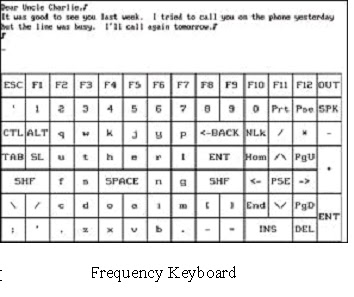
Typewriter program. The user types by looking at keys on visual keyboards. The user may "speak" or print what he has typed.


The Lights and Appliances program, which includes computer-controlled switching equipment, provides  Eye gaze control of lights and appliances anywhere in the home or office. 


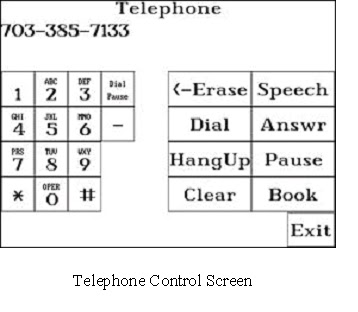
The Telephone program allows the user to place and receive calls.  Frequently used numbers are stored in a telephone "book". Non‑verbal users may access the speech synthesizer to talk on the phone.


  The Read Text program allows the user to select text for display and "advance to the next page" with his eyes.

The Portable Eyegaze System can be mounted on a wheelchair and run from a 12-volt battery or wall outlet.  It weighs only 6 lbs
The Portable Eyegaze System comes with a flat screen monitor and tables mount for its monitor. 
The monitor can be lifted off the table mount and slipped into a wheelchair mount. 


Portable Eyegaze System Mounted on Wheelchair

THE POWER OF TECHNOLOGY!!!